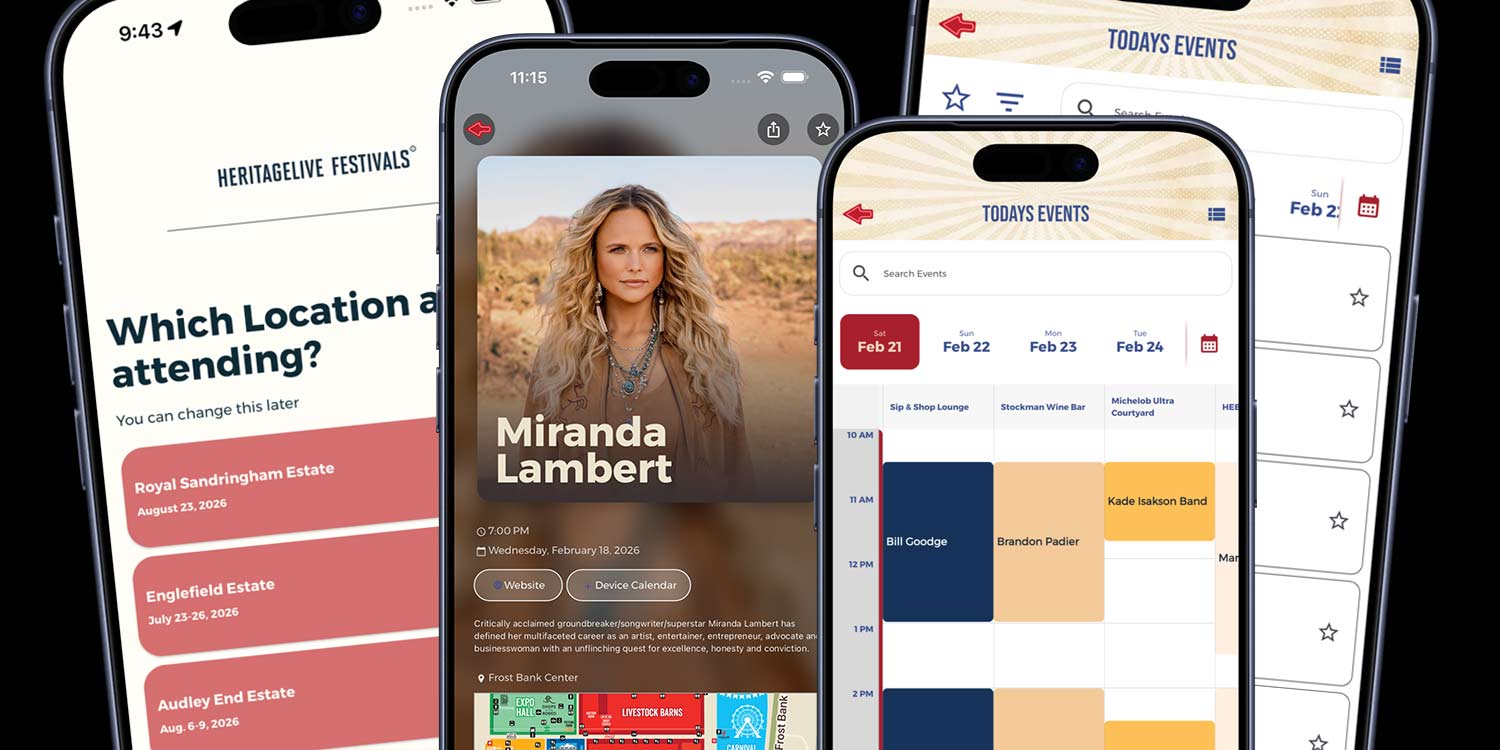
Our app platform keeps getting better year after year. Even if you stay in the same package, your app continues to evolve as new features and improvements roll out over time. The February 2026 release adds new tools focused on smarter onboarding, stronger home screens, and better content control.
This release applies to the attendee-facing app experience and is separate from recent admin updates.
Please note: Enabling any of these new app-platform features after February 25, 2026 will require an app resubmission to Apple and Google.
Below is a breakdown of what’s new, organized by package level.
Titanium Package
City or Location Selector During Onboarding
Multi-location events can now allow users to select their city or location during onboarding.
This is especially powerful for events like the Great Outdoors Comedy Festival, which takes place in multiple Canadian cities throughout the summer.
Once a user selects their location:
- The app clearly identifies which city they are viewing
- The user is automatically subscribed to that city-specific alert group
- Switching locations is simple and accessible
Previously, organizers often created separate custom pages for each city. Now, you can keep one consistent home page for all locations while dynamically personalizing the content experience.
One home page. One set of graphics. Location-specific content handled intelligently behind the scenes.
Platinum and Above
Onboarding Alert Group Opt-In
Users can now opt into specific alert groups during onboarding.
Rather than relying on attendees to find alert preferences later, this feature captures subscriptions at the moment of first engagement. It mirrors the functionality of the full alert management screen but places it where it will be seen and acted on.
Home Page Dynamic Ticker for Events and Lists
Add a dynamic, clickable ticker to the home screen to keep attendees informed in real time.
The ticker can:
- Highlight a single key message
- Rotate through live and upcoming events
- Pull titles and subtitles from any list
This is ideal for live schedule highlights, sponsor visibility, featured announcements, or real-time updates.
Home Page Embedded Search Bar
Search is now embedded directly into the home page.
Users can instantly search events, vendors, sponsors, or custom lists without navigating deeper into the app. Faster discovery improves engagement and usability, especially at larger events.
Gold and Above
Home Page Custom Message Ticker
Gold and above packages can add a full-width custom message ticker to the home screen.
Simple to update and highly visible, it supports up to three rotating messages at a time and can click through to a single page within the app.
Perfect for:
- Weather updates
- Parking reminders
- Last-minute announcements
- Sponsor recognition
Schedule and List Detail Pages: Three Additional Layout Options
Detail pages now include three additional layout options.
Organizers have more control over:
- Visual hierarchy
- Image presentation
- Spacing and readability
- Information grouping
This allows the content experience to better align with your event’s branding and tone.
List Intro Area
Lists now include an optional introduction area at the top between the search bar and table.
Use this space to:
- Provide context for vendors or exhibitors
- Add sponsor messaging
- Offer attendee instructions
It improves clarity without requiring additional custom pages.
Coupons and Rewards: Post-Redemption Per-Coupon Code
Coupons and rewards can now generate a distinct, trackable alphanumeric code upon redemption.
This strengthens:
- Vendor validation
- Sponsor reporting
- Redemption tracking
- Fraud prevention
Each redemption produces a unique code tied to that specific offer.
Silver and Above
Transit Map Option
Silver and above packages now include a dedicated transit map option.
This feature is especially helpful for events serviced by subway or bus systems, where attendees rely on public transportation routes and stop locations.
It keeps transit information clear, centralized, and easy to access within the app.
Time-Grouped Schedules
Schedules can now group events by identical start times.
For example:
- All 10:00 a.m. events are grouped together
- All 10:30 a.m. events are grouped together
This creates a cleaner, more organized schedule view while maintaining proper chronological sorting.
Month-at-a-View Calendar Selector
Multi-day events now include a month-at-a-view calendar selector within the schedule.
Attendees can quickly jump between dates with a familiar calendar interface, improving usability for festivals, fairs, conferences, and our year-round partners.
Bronze and Above
Timetable Enhancements
The timetable view, formerly known as the timeline view, has received major usability improvements.
The enhanced timetable now supports:
- Smoother diagonal exploration
- More flexible time-axis layouts
- A new default side-time layout for a cleaner scan path
- Continued support for classic top-time mode
- Scalable headers that adapt to different event styles
- Adjustable spacing and time-column width
Organizers can fine-tune readability based on their content mix and audience needs, creating a more polished and brand-aligned schedule experience.
Button Shape
One style, everywhere: button corners are now driven by a single global setting, so your app can switch look-and-feel consistently from one place.
The available options are:
- Square Corners
- Soft Corners
- Rounded Rectangle
- Pill
February 2026 Release Overview
This release focuses on four primary improvements:
- Smarter onboarding that increases clarity and subscriptions
- Stronger and more dynamic home screen communication tools
- Greater flexibility across schedules, lists, and layout presentation
- Significant usability upgrades to the timetable experience
From Silver through Titanium, every package level received meaningful enhancements designed to improve both attendee experience and organizer control.
If you would like to explore which of these features are the best fit for your event, we are happy to walk through it with you.