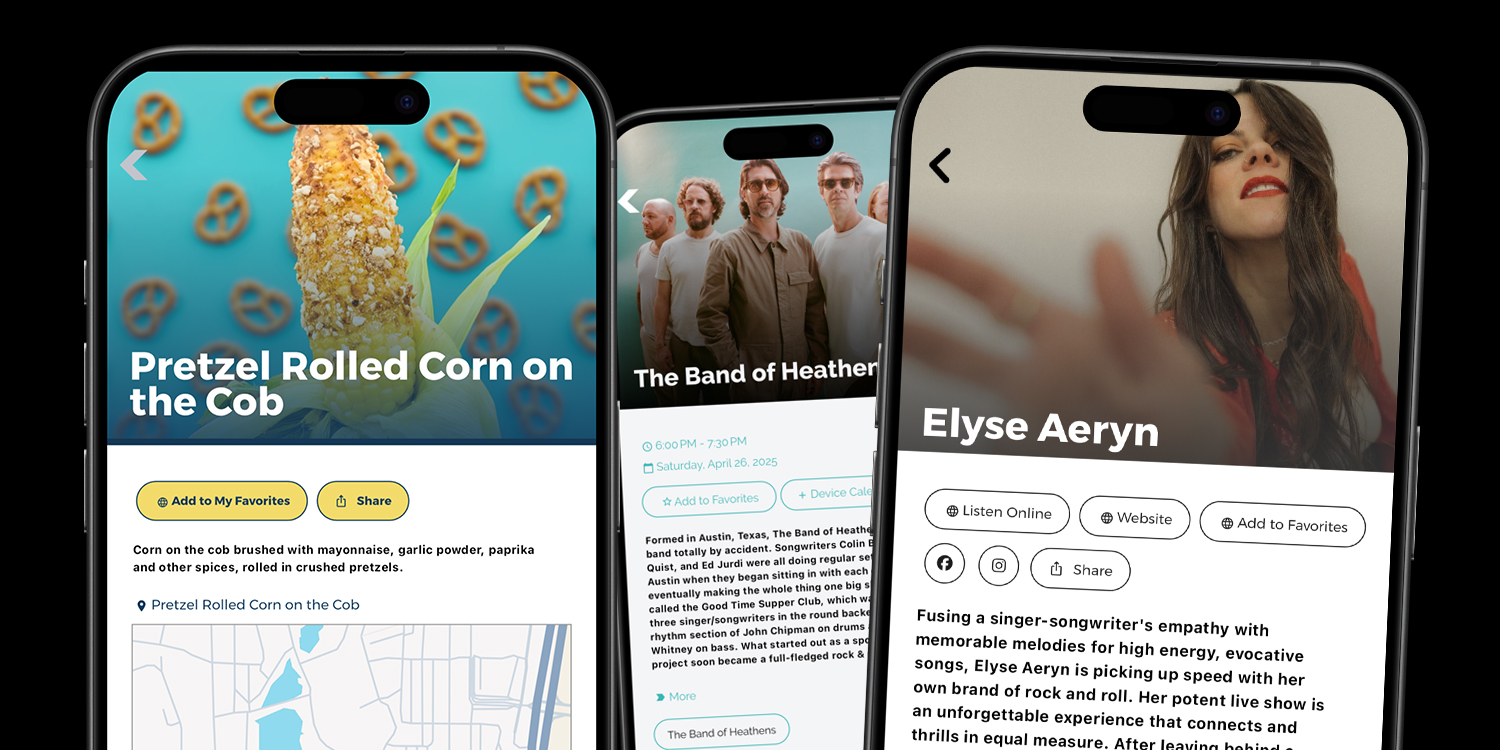
✨ New Detail Page Layouts & Design Options Now Available!
We’ve rolled out some exciting new customization options for Event Detail and List Detail pages—designed to give your app a more modern, flexible, and polished feel. Whether you want to elevate your visual design or fine-tune how content is presented, this update offers more control than ever before.
Headline Over Image – A Stunning First Impression
You can now move the title or headline directly on top of your feature photo! This new layout (enabled on the Detail Page tab in Add/Edit List Group and Add/Edit Calendar Group) creates a bold, visually immersive experience for your users. Prefer the original setup? No problem—just stick with the default where the headline appears below the image.
Choose Between Image or Classic Header
Not every page needs a top image. Now, for both Event and List Detail screens, you can select a traditional text header —perfect for pages that don’t have a featured image or when you want a cleaner, more streamlined layout.
Flexible Button Placement
Need key actions more visible? You can now move your menu buttons above the map instead of the default spot below it. This update gives you more freedom to guide users to important links right away.
Custom Button Styling Per Page
You asked—we delivered! You can now stylize buttons independently on each detail page. Whether it’s a donation link or a signup form, you can now choose button styles that match the tone of that page specifically.
Per-Page Header Color Options
In addition to global styles, you can now set custom header colors for each page. This is a great way to align with a specific brand or create a unique vibe for different areas of your app.
Available Now
These features are available in apps using version 400 (released 2/10/25) or later.