Your event map is filled with places people want to explore: exhibit buildings, performance stages, attractions, parking lots, and entire sections of your grounds. Many of those places already have a recognizable shape, label, or illustration on your map. Now, those spaces can become interactive.
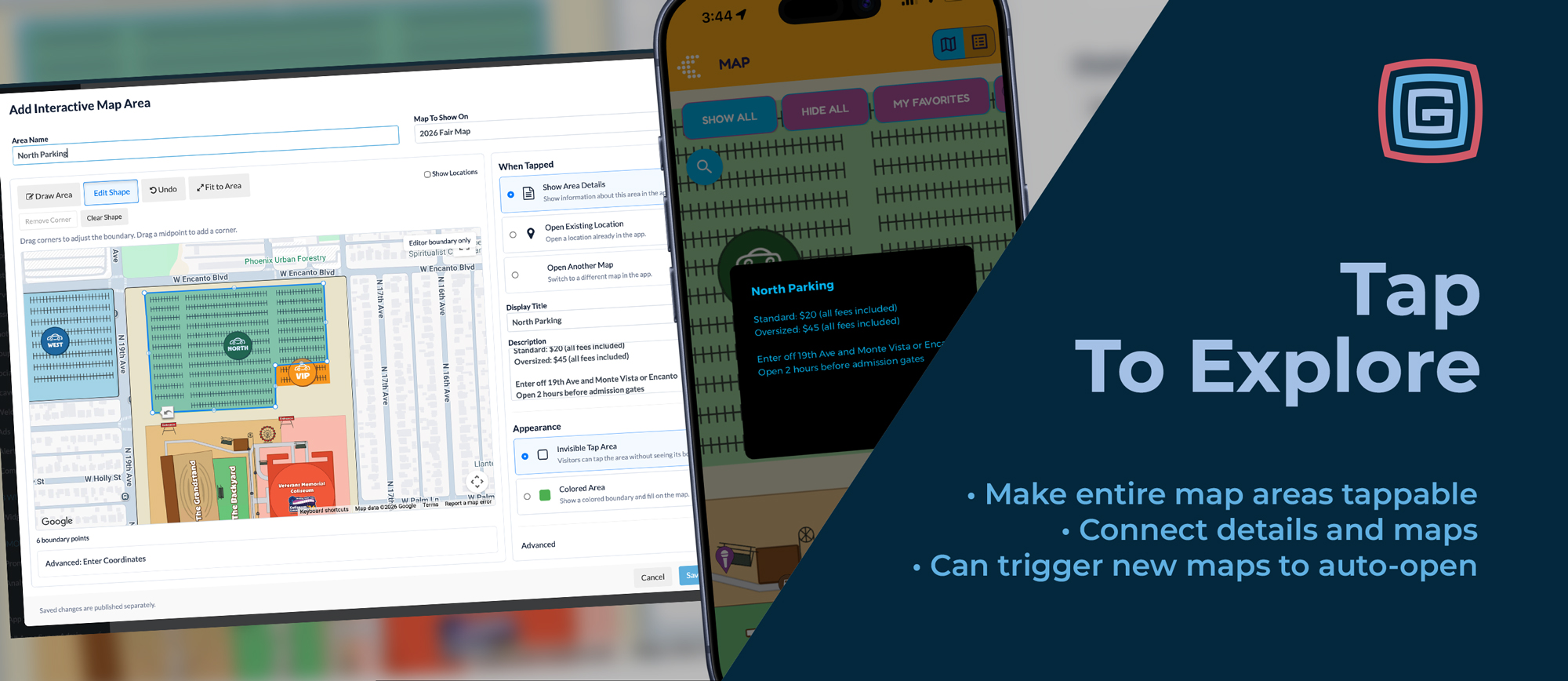
Grandstand’s new Interactive Map Areas let visitors tap anywhere within a defined area to discover more. A building can open its location details. An attraction can display a quick explanation. A large exhibit hall can open a separate map showing what’s inside.
Working alongside your existing map pins, Interactive Map Areas give visitors another intuitive way to explore your event—and give organizers more flexibility in how they connect their map to useful information.
Tap the Place That Catches Your Attention
When visitors see a building or attraction on a map, tapping it is a natural next step. Previously, accessing its information required tapping the location’s individual map pin. For a large building, stage, or exhibition area, that meant finding one small marker within a much larger space.
Interactive Map Areas expand that interaction to fit the place itself.
You define the boundary, and visitors can tap anywhere inside it to open the information you choose. The area can follow a building’s footprint, surround a large stage, or cover a parking lot. You can also trace around an illustrated landmark or label to give it a helpful informational callout.
It makes the map respond more closely to the way visitors see and understand your grounds.
Working in Harmony with Your Map Pins
Interactive Map Areas and map pins work together. Pins continue to identify individual locations, while areas make larger spaces and existing map artwork tappable.
For example, an exhibit building can retain its familiar location pin while also allowing visitors to tap anywhere on the building to open the same details. Someone looking for a marker can use the pin. Someone who recognizes the building on the map can tap the building itself. Both interactions lead to the same location information.
You can combine these approaches throughout your map:
- Use pins for individual food vendors, restrooms, entrances, and other specific destinations.
- Add tappable areas to exhibit buildings, large stages, and activity zones.
- Give illustrated landmarks quick informational callouts.
- Connect buildings or sections of your grounds to their own detailed maps.
When an area links to an existing location, it connects visitors to the information you already maintain for that location. There is no need to create a separate description simply to make the larger space interactive.
You also have the option to hide the associated location pin when the area itself provides the interaction you want. Keep the pin visible alongside the tappable area, or let the map’s artwork serve as the entry point. You can choose what works best for each space.
Three Ways to Connect Visitors with More
Each Interactive Map Area can perform one of three actions, allowing you to choose the right experience for the place.
Show a Quick Informational Callout
Sometimes a space needs only a short explanation.
An area can open a simple dialog with a title and description, making it useful for landmarks, sculptures, parking areas, and other features that benefit from a little context.
A visitor could tap a large parking lot to read information about that area, or tap an illustrated attraction to learn what it is. These callouts let you add helpful detail without adding more text to the map artwork itself.
At Muertos Fest, for example, tapping the La Reina Sculpture illustration opens a short description of the installation. The illustration remains part of the map’s design while also becoming a way to learn more.
Open an Existing Location’s Details
For spaces that already have a location in your app, an Interactive Map Area can open that location’s existing detail panel.
This is especially useful for buildings and exhibition spaces with associated content. Visitors can tap the larger area to reach the location information and any listings already connected to it.
In the Muertos Fest example, tapping an altar exhibition area opens the corresponding location details and its associated altar listings. Visitors can access that information by tapping the exhibition space or its existing map pin.
The same approach can help visitors explore an exhibit building, discover information about a large stage, or learn more about an activity area.
Open Another Map
Some places deserve a closer look.
An Interactive Map Area can open another map within your app, connecting an overview of your event to a more detailed view of a particular space.
Imagine a large exhibit building on your main fairgrounds map. Visitors tap the building and open a separate map dedicated to its interior. From there, they can explore the layout in greater detail.
This gives you a natural way to organize maps at different scales. Your main map helps visitors understand the grounds, while additional maps help them explore individual buildings or sections.
Preserve Your Artwork or Highlight a Space
Interactive Map Areas offer two appearance options, so you can choose how each area fits into your map.
Invisible tap areas add interaction while preserving the existing artwork. The boundary is not shown to visitors, allowing the buildings, illustrations, and labels already on your map to remain the visual guide.
This works particularly well when your map already clearly identifies a space. A visitor sees an exhibit building, taps its illustrated footprint, and opens the information associated with it.
Colored areas add a visible boundary and fill to the map. These can help define a space that needs more visual emphasis, such as a parking area or activity zone.
You can use different approaches across the same map. Some spaces may benefit from a visible highlight, while others work best with an invisible area over the existing design.
Interactive Map Areas support all Grandstand map types, giving you this flexibility across your event’s mapping setup.
Built for the Different Shapes of Your Event
Event spaces rarely fit neatly into a single point. A building stretches across a block. A performance area includes more than the stage itself. An exhibition follows a long walkway. A parking lot occupies a broad section of the grounds.
Interactive Map Areas let you define boundaries that fit those spaces.
- Exhibit buildings: Make the building’s full footprint tappable to open location details or an interior map.
- Large stages: Give visitors a larger area to tap when they want to explore the stage’s information.
- Parking areas: Provide a quick callout with details relevant to that lot.
- Landmarks and attractions: Turn an existing illustration into an opportunity to learn more.
You can apply the feature wherever it makes the map more useful, while continuing to use pins throughout your grounds.
Create and Manage Areas Yourself
Interactive Map Areas are fully manageable through the Grandstand admin. Your team can create, adjust, and publish them without requiring Grandstand to set them up for you.
The process is straightforward:
- Choose your map and name the area.
- Draw its boundary around the building, attraction, or space you want visitors to tap.
- Choose what happens when tapped: show a short callout, open an existing location, or open another map.
- Set its appearance as an invisible tap area or a colored area.
- Save and publish your changes to the app.
The visual editor lets you adjust the shape by dragging its corners and adding points as needed. You can refine the boundary to fit the space, then return to edit it as your event plans evolve.
That puts control in your team’s hands, whether you are adding one informational callout or making several major buildings interactive.
Understand What Visitors Explore
Taps on Interactive Map Areas are tracked in analytics, giving organizers insight into how visitors engage with these parts of the map.
That tracking helps you understand which areas visitors are exploring and seeking information about, adding another perspective on how people use your event map.
Included with Platinum and Titanium
Interactive Map Areas are available now at no additional fee for Grandstand’s Platinum and Titanium clients. An app resubmission may be required before the feature can be used in your app.
If you are already on Platinum or Titanium, contact us to confirm your app is ready and start creating areas in the Grandstand admin.
Interested in bringing this capability to your event? Contact Grandstand to learn about upgrading and how Interactive Map Areas can work alongside your existing pins to make your map more useful, informative, and intuitive to explore.