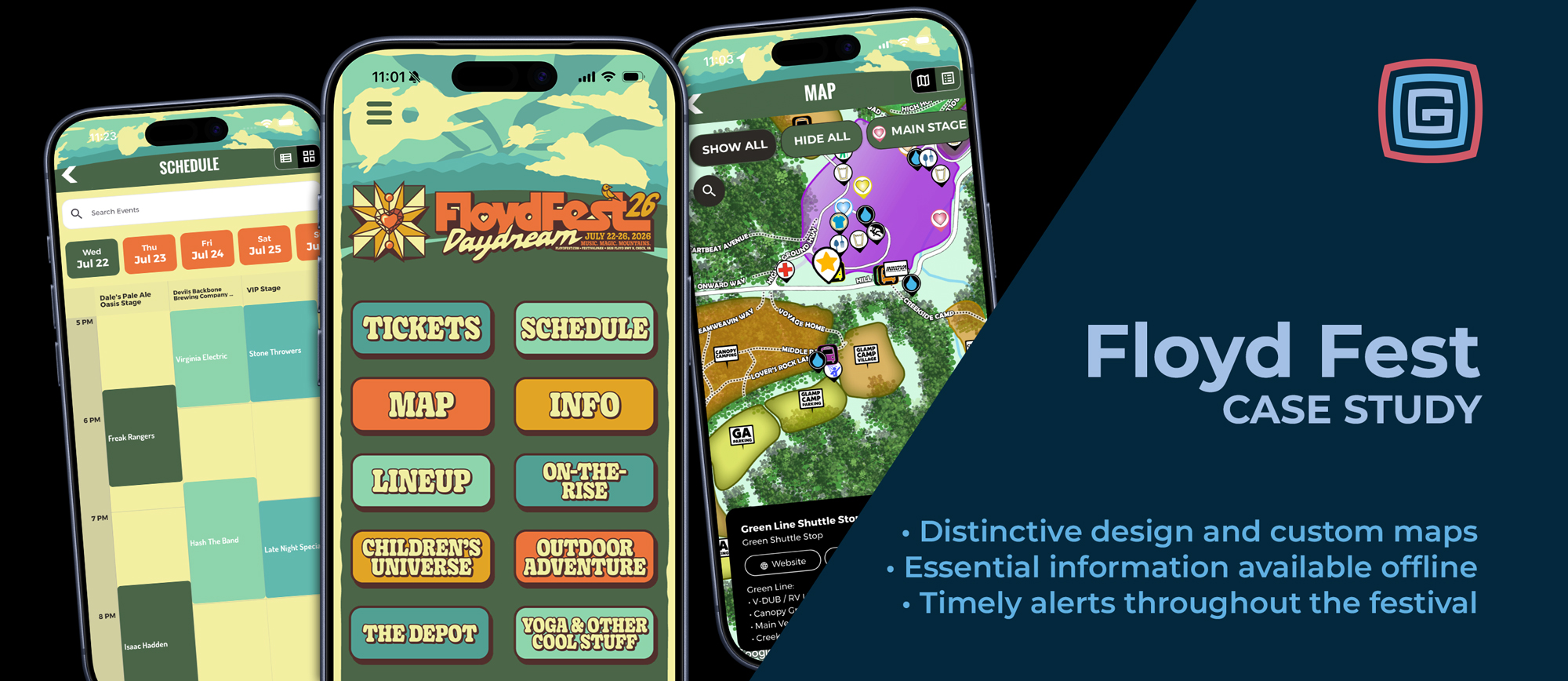
At FloydFest, the experience stretches across stages, campsites, winding paths, and a mountainside setting. Helping fans enjoy it means bringing together the music they came to hear, the places they need to find, and the updates that matter as the festival unfolds.
For two years, FloydFest has used Grandstand to put those pieces together in an app that reflects the festival’s distinctive personality. Managed by the organizers themselves, it combines a strongly branded design with practical tools for planning, exploring, and staying informed.
A Festival Identity From the First Tap
FloydFest’s app brings its visual identity directly onto the home screen. Illustrated artwork, expressive lettering, and a coordinated color palette carry the festival’s character into the digital experience.
The layout is straightforward: a two-column arrangement of large buttons gives visitors clear starting points for the schedule, map, lineup, and festival information. That same structure makes room for experiences beyond the stages, including outdoor adventures, children’s activities, and yoga.
It’s a useful example of how much personality a simple layout can hold. The artwork establishes the atmosphere, while clear navigation helps visitors get to what they need.
A Map That Belongs to the Mountainside
FloydFest’s custom map is a centerpiece of the app. An illustrated overlay presents the festival grounds in a style connected to the event, with feathered edges that help the artwork blend into the surrounding mountainside.
Custom map pins use distinctive graphics and text to identify places across the grounds. Visitors can explore stages, camping areas, parking, shuttle stops, and amenities, then open locations for more information.
Those details matter when a day involves moving between a campsite, a performance, a meal, and a shuttle stop. A shuttle location can include the areas its route serves, helping visitors understand their options for getting around.
Stages also connect to schedules, bringing the questions “Where is it?” and “What’s happening there?” into the same experience.
Two Ways to Explore the Music
FloydFest gives fans access to both a traditional schedule view and a timetable view. The traditional view offers a familiar way to browse performances and event details. The timetable helps visitors see how programming fits together across stages and where performances overlap.
Both views help fans make sense of a festival with multiple things happening at once. Visitors can choose the presentation that fits how they like to explore and plan.
The app also gives fans a way to participate through On-the-Rise voting. Alongside discovering performances, visitors can support their favorite competing artists by casting a vote within the app.
Essential Information, Even Without a Signal
FloydFest’s mountain setting is part of its appeal. It also puts visitors farther from everyday services, with limited cell reception making it important to have festival information already on hand.
For fans spending several days moving between stages and campsites, offline access is essential. Checking a downloaded schedule or looking up festival information needs to work even when a connection is unavailable.
Grandstand’s native apps store downloaded core content on the device, keeping that information available between connected updates. Visitors can prepare by downloading and opening the app before arriving.
A connection is still needed to receive new push notifications, download changes, and use online features such as voting. Saved content supports everyday exploration, while connected updates help visitors adjust as festival plans change.
Keeping Fans Informed—and Exploring
Weather has been a significant factor at FloydFest over the past two years, making timely communication an important part of the app’s role. Organizers have put push notifications to work with 80 alerts covering practical updates, performances, participation, and festival activities.
A few examples show how those messages support different parts of the visit:
- Adjusting to the weather. “Reminder: VIP entering at noon, GA at 2” explained a weather-related change to gate opening times, giving visitors specific information to adjust their arrival plans.
- Getting around the mountain. “Getting Around the Mountain” encouraged visitors to check shuttle stops and routes, linking directly to the app’s Shuttle Maps page.
- Finding the next performance. “Greensky Bluegrass on the main stage” reminded fans about the upcoming 9 p.m. show and linked to the schedule.
- Taking part in On-the-Rise voting. A voting reminder linked directly to the On-the-Rise page, with follow-up messages keeping the submission deadline in front of fans.
- Discovering sponsor activities. “Win E-bikes from Omnibuild” invited visitors to the Omnibuild Canopy Stage to enter a giveaway, connecting a festival partner with an activity fans could join.
The festival’s friendly, distinctive voice carries through these updates, just as it does through the app’s design. Notifications give organizers a way to bring useful information forward while directing visitors to the schedule, maps, and activities already available in the app.
Managed by the People Behind the Festival
FloydFest’s organizers manage the app themselves through Grandstand Admin, maintaining its content and communicating with their audience. The people planning the festival also manage how that experience is presented to visitors.
Across two years, FloydFest has brought together a distinctive home screen, a carefully designed map, flexible schedule views, offline content, and active communication. Each serves a practical purpose while staying connected to the character of the festival.
Planning a music festival app? Explore Grandstand’s music festival solutions to see how your branding, lineup, grounds, and visitor information can come together.